Workflows overview
A workflow is a packaged routine: you give it documents and, for most of them, a place in the workbook, and it returns a result you can review. The same input gives the same result.
Launch a workflow
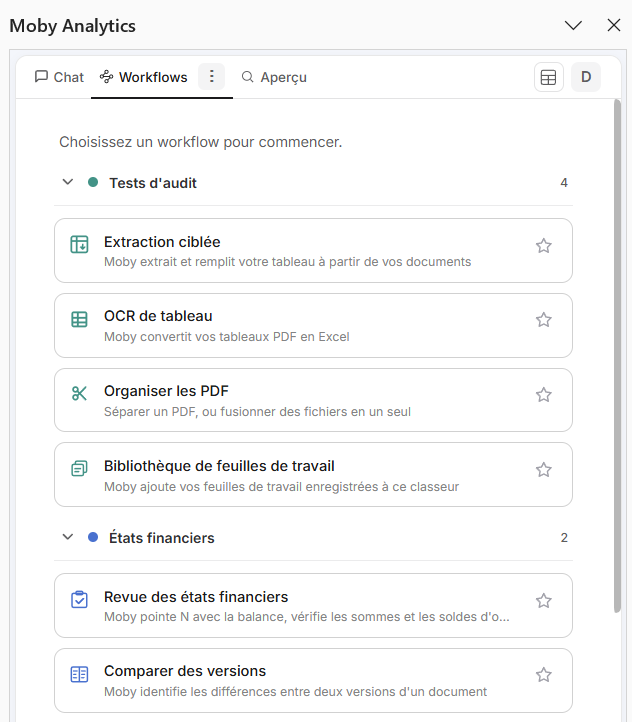
The Workflows tab. A tile opens the card of its workflow.
| From | How |
|---|---|
| The Workflows tab | Click a tile. The tiles are grouped as Audit tests, Financials and Data analysis; the ones you star appear under Favorites |
| The Chat tab | Type / and pick a workflow, or type its shortcut. Its card opens in the Workflows tab |
A workflow runs in the background. Its card shows the progress, lets you cancel, and offers to continue in the chat once it is done.
| On the card | What it is for |
|---|---|
| Confirm launch | Shown before a run whose estimated cost is significant. The card gives the estimate: Launch starts the run, Cancel stops there |
| The question under the result | Asks whether the run did what you wanted. If it did not, say so and pick a reason: it helps us avoid the problem next time |
| Chat about these results | Continues in the chat, with the result as context |
| Run another workflow | Returns to your favorites |
| Report to support | Shown when a run fails. It opens the support form with the context of the run |
Past runs are listed under History, in the menu of the Workflows tab.
The workflows
| Shortcut | Name | What Moby does | Use it when |
|---|---|---|---|
/extract | Extract targeted data | Fills a table from documents. Two modes, picked from your table: extraction (one new row per document) and matching (each document matched to one of your rows, then its empty columns filled) | You need a few precise values per document, from a batch of documents or for a sample to test |
/ocr | OCR table | Converts the tables of a PDF, native or scanned, into Excel cells | You need a whole table (statement lines, an aged balance), not a few values |
/split | Organize PDFs, Split | Finds the document boundaries in a PDF that bundles several documents and writes one file per document | A bundle arrives as one PDF, before any extraction |
/merge | Organize PDFs, Merge | Assembles several files into one PDF, in the order you set | One document arrived in pieces: scans page by page, phone photos, a contract and its amendments |
/workpaper | Workpaper library | Adds saved sheets to the workbook, yours or the ready-made Moby ones | You want to start from a sheet already built for the test |
/review | Review financial statements | Ties year N to the trial balance, casts the sums, checks the N-1 opening balances and compares the notes with N-1 | You have financial statements to review |
/compare | Compare versions | Lists the differences between two versions of a document | Contract amendments, restated statements, redlines |
/statements | Analytical review (GL) | Builds financial statements and analyses from a general ledger file | Analytical review from the ledger |
/load | Analyze large files | Loads a CSV or TXT file into the data model and builds a PivotTable | The file is too large for a sheet |
/pack | Due diligence pack Beta | Builds the due-diligence pack from the ledgers | Acquisition audit |
/sales | Sales to cash Beta | Traces revenue through receivables to cash from the general ledger | Revenue and receivables testing |
Two more shortcuts answer in place rather than open a card: /help asks the agent how Moby works, and /support opens the support form.
Workflow or agent?
Extraction workflow (/extract) | Agent (chat) | |
|---|---|---|
| Who decides the path | Moby's coded workflow | The AI, step by step |
| Made for | Extracting data points | Calculating, transforming, charting, writing |
| Volume | Up to 200 documents per run, 200 pages each | Up to 20 documents attached, about 200 pages in total |
| Cost | About half the cost | Higher |
| Result | The same every time | More variable |
By default, the extraction workflow. The agent when you must calculate, transform or write. See Ask the agent.
Good habits
| Rule | Avoid | Do |
|---|---|---|
| One value, not a presence | "Is there an invoice in this document?" | "Invoice number" |
| A clear title, and a description under it when the title alone is unclear | "Amount" alone | "Amount incl. VAT", or "Amount" with the description "incl. VAT, in euros, bottom right of the document" |
| The workflow extracts, it does not compute | Asking the workflow for the sum of the lines | Extract the values, then sum in Excel |
| Paste only what is needed | The whole general ledger | The rows and columns useful to the check |
| One document per PDF | A PDF bundling several documents, or one document spread over several files | /split a bundle first, /merge the pieces first |
The full set of rules is in Build a good table.